


Table of Content
While talking to any business, the customer experience should be always great. The effortless communication which we have with our friends and family somehow is lost whenever we transit into the world of “press 1 to talk to the customer support team or press 2 to talk to the sales department”. As a business owner, always remember that customers need prompt response and it’s your responsibility to provide the same.
REVE Chat completely understands this dynamic, and keeping this in mind, we have recently launched Viber Integration with REVE Chat.
How does it work?
REVE Chat enables customers to talk to you through other popular messaging apps like Viber. All you need to do is creating a public account in Viber and integrating it with REVE Chat.
Here, customers can send messages to your support team through the Viber public account and the team will be able to receive and reply to those messages from REVE Chat dashboard itself.
How to integrate REVE Chat with Viber?
- To get started, you need to create a public account in Viber. To know more and create the public account, click here.
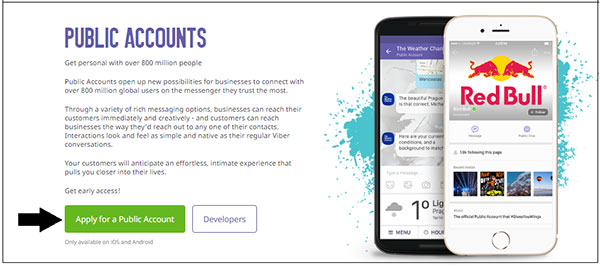
Once you create a public account in Viber, you will get an ‘App Key/Authentication Code’ which you need to enter during the Viber integration process. To get the ‘App Key’, go to Viber>Public>your public account>Edit Info>Your app key>click on copy.
-
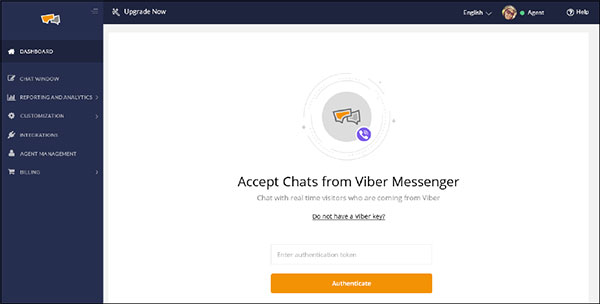
Next, login to REVE Chat dashboard and select ‘Viber Messaging’ under ‘Customization’.
-
Here paste the ‘Authentication Token/App key’ in the given box and click on ‘Authenticate’. That’s it. You have successfully integrated REVE Chat with Viber.
Now, you will be able to receive and respond to the Viber messages from the REVE Chat dashboard itself.
How customers will send you messages from Viber?
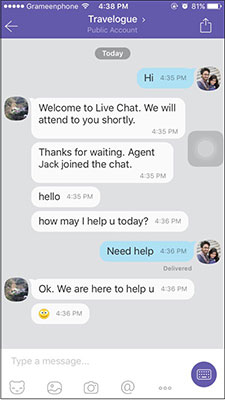
First of all, you need to share the name of your public account with the customers. They will search by that name in Viber and after that can send you messages. For example, the name of the public account is ‘Travelogue’. Customers will search by this name and then will send you messages which you will receive in the REVE Chat dashboard.
Need help?
If you need any help regarding the installation process, live chat with us or mail us at support@revechat.com
Build AI-powered support with Wize AI
Connect business knowledge, automate support conversations, and improve response quality without managing a complex AI stack.
Explore Wize AI Agent Rate the article

Suvashree Bhattacharya
Writer
Suvashree Bhattacharya is a researcher, blogger, and author in the domain of customer experience, omnichannel communication, and conversational AI. Serving as a content marketing strategist at REVE Chat, she develops contextual and interesting content for customers from different industries and segments like customer service, customer satisfaction, engagement, messaging platforms, etc. Passionate about writing and designing, she pours her heart out in writeups that are detailed, interesting, engaging, and more importantly cater to the requirements of the targeted audience. Her interests include reading, painting, and traveling.
View all articles
Build AI-powered support with Wize AI
Connect business knowledge, automate support conversations, and improve response quality without managing a complex AI stack.
Explore Wize AI Agent